Policies
Policies define which nodes are allowed to communicate with other nodes and resources. Netsody uses a default-deny model: if no policy allows traffic, the traffic is blocked.
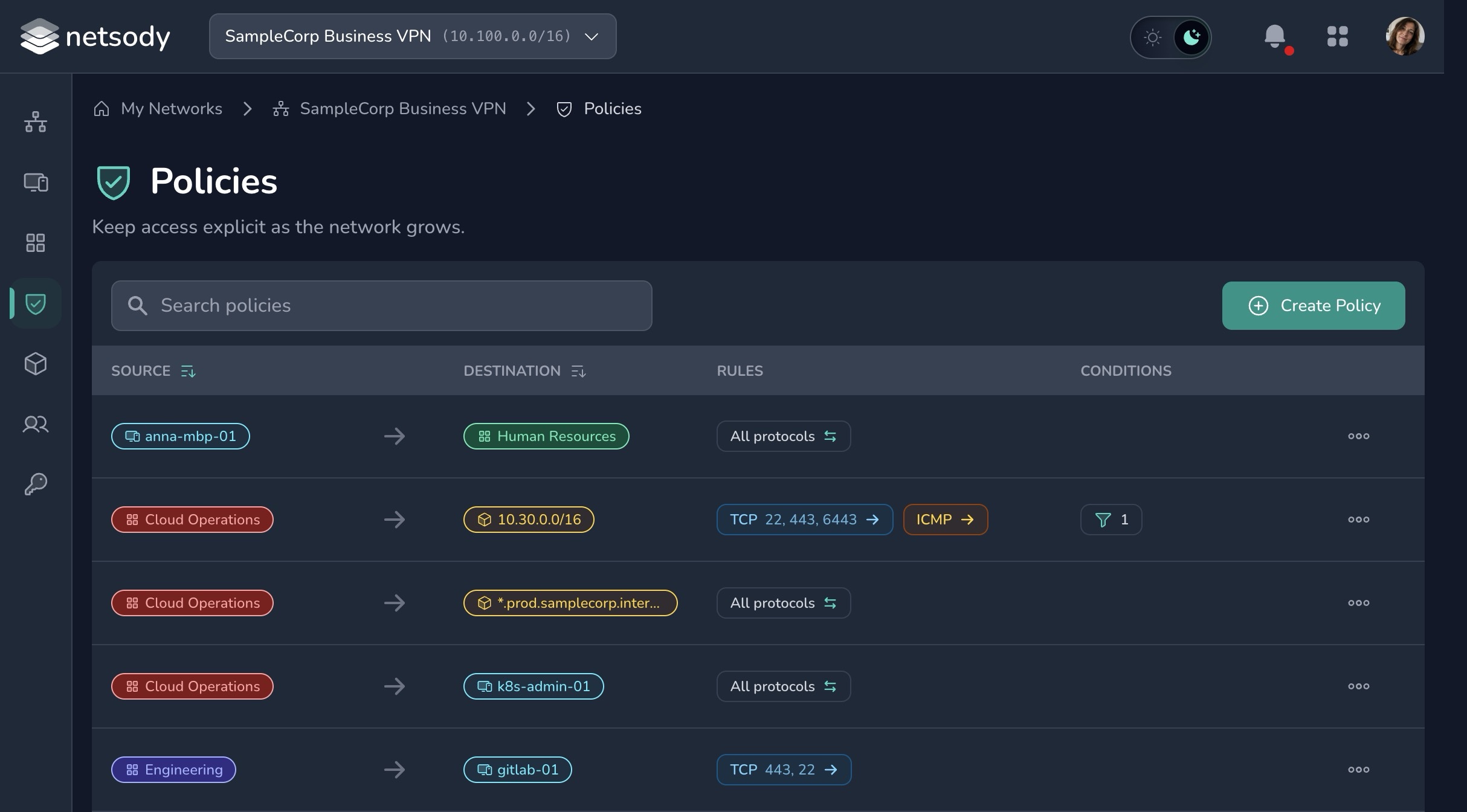
Policies are enforced on the nodes by the local agent.
Policy design
Start with the smallest policy that supports the intended workflow:
- Allow workstations to reach a specific server group.
- Allow admins to reach management hosts.
- Allow selected devices to use a resource behind a gateway.
Avoid broad policies that allow all devices to communicate with all other devices unless you are creating a temporary test network.
Directionality
Every policy has one or more sources and one or more destinations. Sources can be groups or individual nodes. Destinations can be groups, individual nodes, or resources.
This lets you write policies at the level that matches the intended access: a group can reach another group, selected groups or devices can reach a group of resources, or one specific device can reach one specific resource.
Existing Netsody policies are evaluated bidirectionally for node-to-node access: if one node group is allowed to contact another node group, the reverse direction is allowed as well.
A group used as a destination resolves to the union of the nodes and the resources tagged with it, so a resource can be reached either by targeting it directly or by targeting any group it belongs to.
Resource access requires an explicit policy. The special ALL group applies to nodes, but it does not implicitly grant access to resources.
Rules and conditions
Rules can restrict a policy to TCP, UDP, or ICMP traffic and, where applicable, to specific ports.
Conditions add context to a policy. They make the policy apply only when the node that initiates the connection matches the configured criteria.
- Source IP address: Limit a policy to devices that are currently in, or outside, specific IP networks. This can route access to company resources through a gateway when a user is outside the company network, while allowing direct access when the user is local. If your environment uses location-based IP ranges, such as GeoIP-derived ranges, this can also bind access to private resources to the user's location.
- Netsody version: Require a minimum Netsody version, or allow only selected versions, before a node can use the policy. This is useful when access should require an up-to-date agent version.
- Operating system type: Allow or exclude specific operating system types. For example, a policy can exclude mobile devices or limit access to desktop platforms when that is appropriate for the resource.
When a policy has multiple conditions, all of them must match before the policy allows traffic.
Conditions are evaluated by the agent on the node that initiates the connection, based on information that node reports about itself. They adapt behavior to the node's current environment and are not a security boundary. The security boundary is the policy itself, which the destination enforces independently. Do not use conditions to keep a compromised node away from a destination.
Review checklist
- Does the policy name explain the intent?
- Are the sources and destinations narrow enough?
- Is resource access limited to the users or nodes that need it?
- Can the policy be removed when the workflow ends?